
Quick answer: To accept Bitcoin as a business, sign up with a Bitcoin payment gateway like Tender, complete KYC verification, create an Outlet for how you sell (online, in person, or through an API), and start sending customers a Bitcoin payment request. The customer pays from their own wallet. Tender confirms the payment on the blockchain, credits your wallet, and lets you withdraw in your local currency or keep it as crypto. Setup takes about a day, mostly because of KYC approval.
Customers around the world already hold Bitcoin, and more of them want to spend it. Businesses that can take Bitcoin payments reach buyers their competitors can’t, including international customers, diaspora buyers, and crypto holders who’d rather pay in the asset they already own.
The challenge for most business owners is practical. How do you take Bitcoin without running a node, watching the price all day, or tracking payments by hand? This guide walks through how to accept Bitcoin as a business, from choosing a method to getting paid in the currency you use every day.
Why businesses accept Bitcoin payments
Businesses add Bitcoin for several reasons, and the right one depends on how you sell:
- Reach new customers: Bitcoin holders can pay you from anywhere, without needing a card that works internationally.
- Avoid chargebacks: A confirmed Bitcoin payment can’t be reversed by a bank, so chargebacks and card disputes aren’t a risk on those sales. This matters most for businesses selling to international customers. See how crypto settlement works on Tender.
- Flexibility with your earnings: You choose whether to convert to cash right away or hold part of your balance in crypto for investment purposes.
- A payment option that stands out: Offering Bitcoin signals that your business is modern and open to new customers.
Three ways to accept Bitcoin as a business
1. Receive Bitcoin to your own wallet
You create a wallet, copy an address, and share it with customers. It’s simple for a one-off payment, but it doesn’t scale. You have to calculate the Bitcoin price for every sale, match payments to orders by hand, and secure your own private keys.
2. Use an exchange account
Some businesses receive Bitcoin into an exchange account. You still handle invoicing and reconciliation yourself, and exchanges aren’t built for checkout.
3. Use a Bitcoin payment gateway (the recommended route)
A Bitcoin payment gateway handles the whole payment flow for you. It creates the invoice, converts the price into an exact Bitcoin amount, monitors the blockchain, confirms the payment, and gets you paid.
Tender is a crypto payment gateway built for exactly this. It lets you accept Bitcoin and over 300 other crypto assets across 20+ blockchains, with settlement in fiat or crypto. Tender also works as a lightweight treasury tool, because your earnings sit in a wallet you control until you decide to withdraw.
How to accept Bitcoin with Tender: step by step
Step 1: Create your Tender account and complete KYC
Sign up at tender.cash and submit your verification details. KYC is required before you can use the platform, and approval typically takes about 24 hours. You’ll get an email when your application is approved.
Step 2: Create an Outlet
Outlets are how Tender connects to the way you sell. You can create one or several, depending on your business.
- Online Outlet: for online stores and platforms. You create the Outlet in your dashboard and receive an API key.
- In-Person Outlet: for physical locations. Tender ships a POS device to you on request.
Many businesses run more than one Outlet so they can accept Bitcoin in every channel they sell through.
Step 3: Connect Tender to your business
For a WooCommerce store: download the Tender plugin ZIP from the Tender docs, upload it to your WordPress site, and add your API key. No developer is needed.
For a custom website, app, or platform: connect through Tender’s API and offer Bitcoin as a payment option inside your own product. This is how Catlog integrated Tender, making crypto payments available to its 50,000+ merchants across Nigeria, Ghana, South Africa, and Kenya.
For a physical store: request your POS device from the dashboard. When a customer is ready to pay, you enter the amount on the device.
Step 4: Accept your first Bitcoin payment
Here’s what your customer sees when paying online:
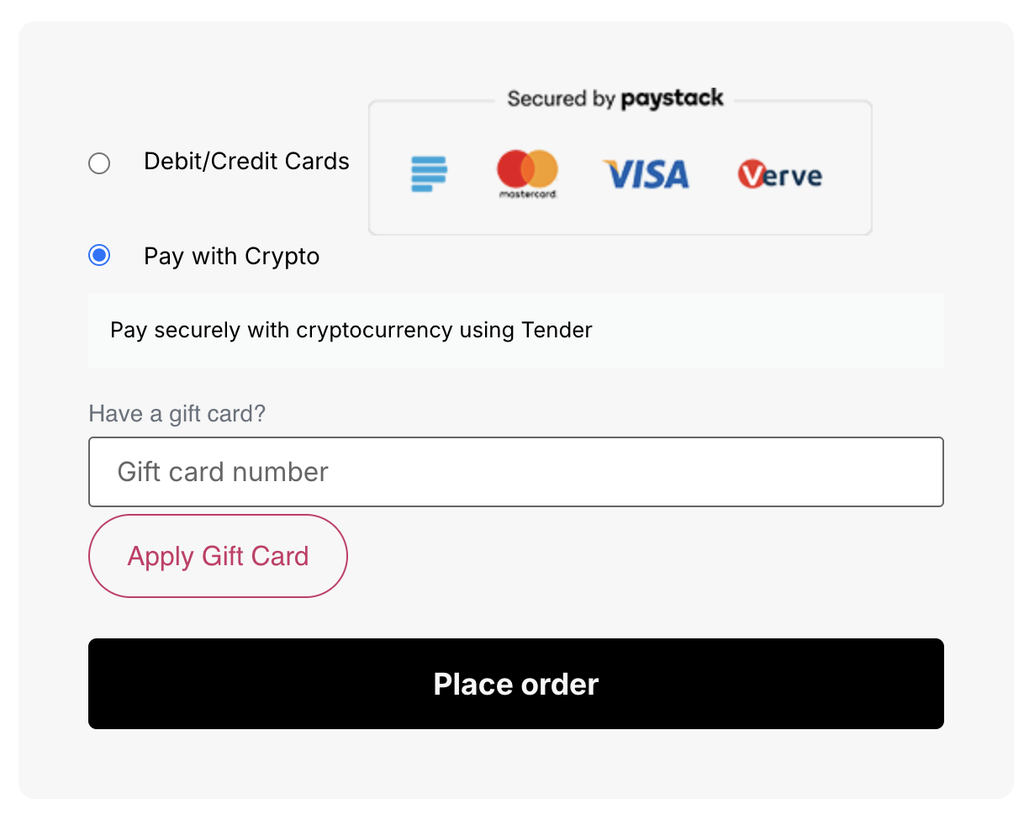
- They select “Pay with crypto” at checkout.
- A Tender payment window shows the invoice amount in your local currency.
- They choose the network and coin, in this case Bitcoin.
- Tender displays a wallet address and QR code with the exact Bitcoin amount due.
- They send the payment from their wallet.
The payment window runs for 30 minutes, which keeps the quoted exchange rate fresh.
In a store, the POS shows the amount, and the customer chooses Bitcoin and either scans the QR code or taps the device with an NFC-enabled phone. Tender’s NFC tap-to-pay makes in-person crypto payments feel familiar to customers.
Step 5: Get paid in the currency you want
Every Bitcoin payment lands in your Tender wallet. From there you choose:
- Fiat payout: select your currency, choose your bank, and enter your account number. Tender converts the funds and sends them to your bank. Settlement currencies include NGN, USD, and GBP, with USD available for any currency not yet supported.
- Crypto payout: send funds to your own wallet by selecting the network, the asset, and your address.
- Auto-payout: set rules once so withdrawals happen automatically.
Tender also lets you swap between crypto assets inside the platform, so you can change what you hold without leaving your dashboard.
What does it cost to accept Bitcoin?
Tender charges 2% per transaction, capped at $100. That applies to receiving, sending, and swapping. The cap means large sales cost the same fee as a $5,000 sale. Bitcoin has no chain activation fee on Tender. Customers pay their own network fee when they send Bitcoin.
How long do Bitcoin payments take to confirm?
Bitcoin confirms through the blockchain, and the timing depends on the network. On Tender’s POS, payments confirm between 1 minute and 2 hours depending on the chain. A few practical tips:
- For online orders, fulfil once Tender marks the payment as confirmed.
- For in-person sales, explain the confirmation step to staff before you launch.
- For high-value orders, wait for the confirmation level you’re comfortable with before releasing goods.
Bitcoin price swings: how to protect your margins
Bitcoin’s price moves, and you don’t have to carry that movement in your business. The invoice amount is fixed when the customer starts paying, and you can withdraw to local currency soon after. Businesses that need predictable revenue typically convert on receipt. If you want to hold some Bitcoin as treasury, you can leave a portion in your Tender wallet and still withdraw the rest.
Do you need a licence to accept Bitcoin?
Rules for accepting crypto vary by country and change over time, so check the current position where you operate. A payment gateway means you don’t need to build your own custody or processing infrastructure to start. Keep clear records of your Bitcoin transactions and speak to your accountant about how your country treats crypto income. Tender’s dashboard reports and on-chain records make that easier.
Which businesses benefit most from accepting Bitcoin?
- E-commerce and online sellers reaching international buyers
- Platforms and marketplaces adding crypto as a payment rail through the API
- Hospitality and retail serving visitors and the diaspora
- Service businesses and freelancers invoicing clients abroad
- Any business with customers who ask to pay in crypto
Frequently asked questions
Can any business accept Bitcoin?
Yes. Online stores, physical shops, platforms, and service businesses can all accept Bitcoin through a payment gateway. You’ll need to complete KYC verification first.
Do I need to understand crypto to accept Bitcoin payments?
No. Your customer pays in Bitcoin and you choose how you’re paid. Tender handles the blockchain side, including invoices, tracking, and confirmation.
How do I accept Bitcoin on my website?
Create an Online Outlet in your Tender dashboard, get your API key, and connect it. WooCommerce stores install the plugin by uploading the ZIP file. Custom sites and apps use the API.
How do I accept Bitcoin in my physical store?
Request a Tender POS device from your dashboard. The customer scans a QR code or taps an NFC-enabled phone to pay.
Can I receive Bitcoin payments in my local currency?
Yes. Withdraw to your bank in a supported currency such as NGN, USD, or GBP. Tender supports 16 settlement currencies, with USD for the rest.
What’s the fee for accepting Bitcoin with Tender?
2% per transaction, capped at $100.
Can a customer reverse a Bitcoin payment?
No. Confirmed Bitcoin payments can’t be reversed by a customer or a bank. If you choose to issue a refund, you send the funds back yourself.
What other cryptocurrencies can my business accept?
Tender supports over 300 crypto assets across 20+ blockchains, including Ethereum, Solana, USDT, and USDC.
Start accepting Bitcoin with Tender today
Tender gives your business a Bitcoin payment gateway for online, in-person, and platform sales, with settlement in the currency you use. Create your Tender account and start accepting Bitcoin payments in about a day.